 Table Status
 Table Status
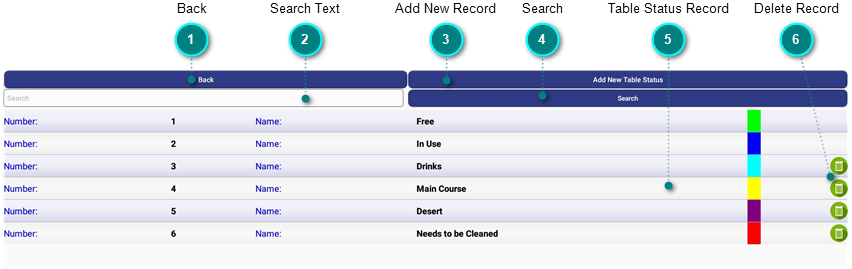
Table Status Maintenance allows you to define the available statuses for your dining tables.
|
Search Text |
|
|
Press in the search field to activate the android keyboard. Enter the text you wish to search for and press on the Search button. All records containing the entered text in the name field will be displayed. |
|
|
|
Search |
|
|
Press on this button to search the Name field for the entered search text. All records containing the search text in the name field will be displayed. Pressing on the Search button will also hide the android keyboard when activated. |
|
Table Status Record |
|
|
Each record will be displayed as an individual row. To edit or view the record details, press and hold on one of the rows. |
|
Delete Record |
|
|
Pressing on the trash can icon will delete the current row. A dialogue window will be displayed asking you to confirm the deletion.
Press on YES to delete the selected row or CANCEL to cancel the deletion.
Please note that the "Free" and "In Use' status are predefined and are required by GoPOS and can not be deleted. |





.png)


.png)